
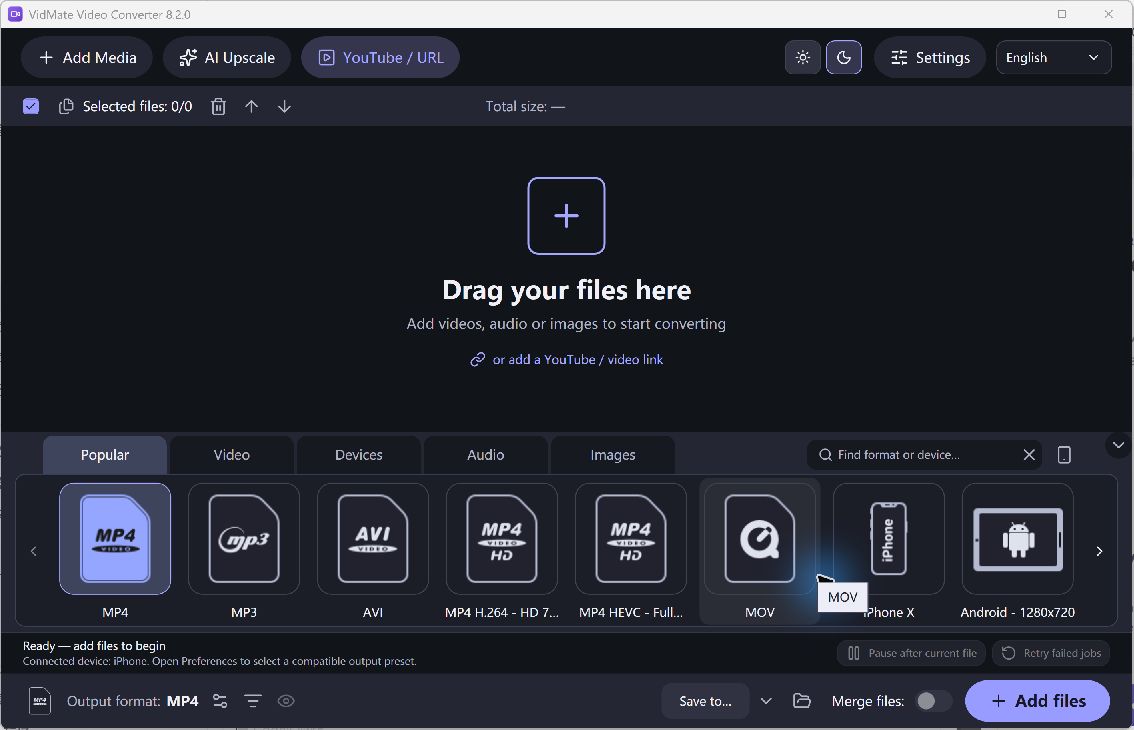
A small first conversion makes the controls easier to understand and limits the cost of choosing the wrong preset. Keep the original video available, create a new output folder, and decide which device or application needs the finished file. Those three choices make the rest of the task more predictable.
Make a First Converted Copy
- Open the Current Converter. Install the Windows desktop release and open VidMate Video Converter. This is a PC conversion utility rather than the similarly named mobile video-download service.
- Add One Video. Choose a supported local source and inspect its queue entry. Starting with one file makes it easier to identify which output belongs to which input.
- Choose the Result. Select a suitable video preset, such as an MP4 option supported by your destination. Use an audio output only when you want the soundtrack separately.
- Choose an Output Folder. Pick a folder you can find again and that has enough space. Review the destination before starting so you do not mistake a previous output for the new result.
- Convert and Play. Start the task and inspect its completion status. Open the new copy in the intended player, check the sound, and only then add more files with the same requirements.
Check the Quality and Output
The current interface and preset list can differ from screenshots published for older releases. Conversion is not a guarantee of better quality, playback on every device or successful recovery of a damaged source. Use reported errors to correct the specific problem before retrying.
A queue lets you repeat a verified task efficiently; it should not replace the first compatibility check.