Add
Add music or recordings to the conversion queue.
SoundTaste Audio Converter · Free Windows Software
Batch-convert music and recordings to MP3, WAV, FLAC, M4A and other supported audio formats on Windows.
Completely Free to Use · No License Key Required
SoundTaste Audio Converter · Windows 11 & 10 · 64-bit
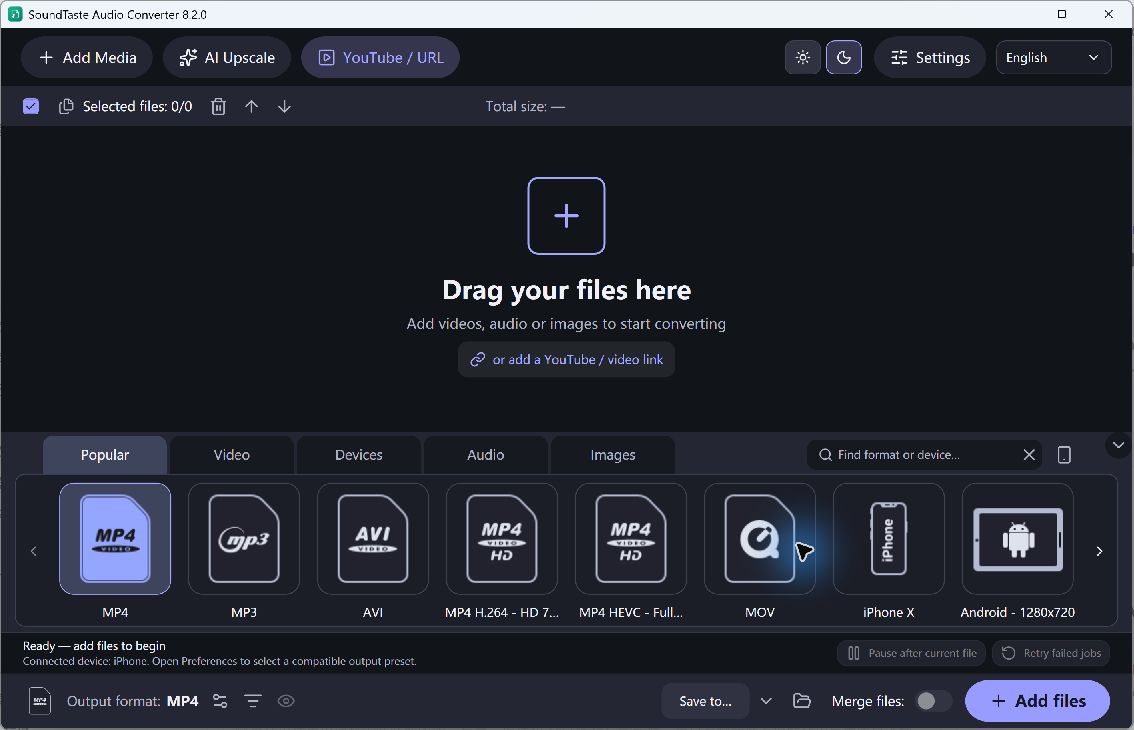
SoundTaste Audio Converter · Actual Windows Application
Choose your task, review the settings and save the result.
Add music or recordings to the conversion queue.
Choose an audio format and output folder.
Run conversion and listen to your new copies.
Use the current free tools for these everyday tasks.
Convert supported recordings to MP3 or M4A for a compatible music player.
Export WAV or FLAC when your next audio workflow needs those formats.
Convert files separately or join them in queue order with the Join files option.
Get the current free installer for your Windows PC.
For Windows
Completely Free to Use · No License Key Required
Optional setup offer: RelevantKnowledge. You can decline it and still use the app.
Setup selects the desktop shortcut and run-after-install options by default. You can change both. A separate RelevantKnowledge research offer is optional; declining it does not prevent installation or use of the main application.
SoundTasteAudioConverter.exe · 164,784,344 bytes
SHA-256
6265c551889f7d0597e57ddd48075f9f86367f0838a2b6ce990eb8a08fb595d6
Check the current features and installation choices.
Yes. The current audio conversion features are free to use without a license key. All five current applications on this site are completely free.
Supported outputs include MP3, WAV, FLAC and M4A. Choose an audio preset in the application to see its available output settings.
Yes. Add multiple files to the queue and convert them with the selected preset. Check a sample output before processing a large collection.
Yes. Add files in the order you want, enable Join files and choose an audio output preset. Check the queue order and listen to the result after conversion.
No. Saving an MP3 as FLAC or WAV cannot restore information already lost in the MP3. Start from the best original you have and avoid repeated lossy conversion.
Yes. Setup may present a separate RelevantKnowledge research offer. Declining it does not block installation or use of SoundTaste Audio Converter.
Download the free converter for your music and recordings.
SoundTaste Audio Converter · Windows Installer (.exe)
Download Free SoftwareCompletely Free to Use · No License Key Required
Windows 11 & 10 · 64-bit